# How to Use a Referral Code?
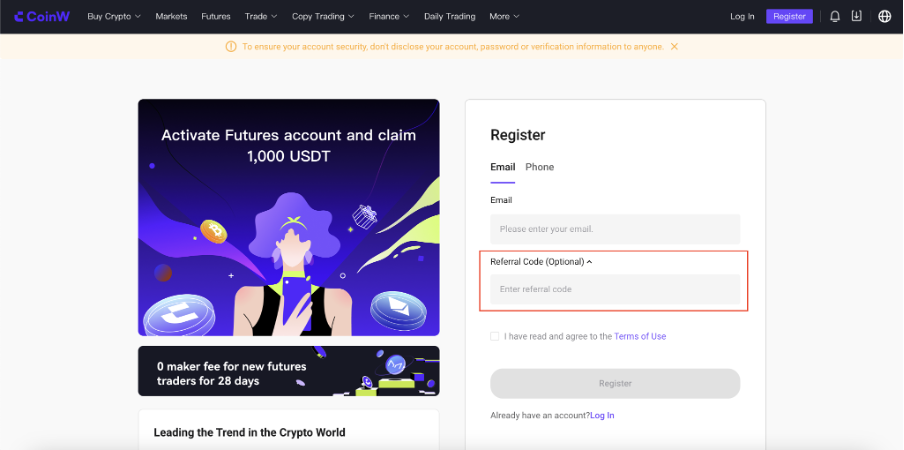
If you want to use a friend's or a business partner's referral code, you need to do this while creating your CoinW account. Once the account is successfully created, it will not be possible to change the use of the referral code.
To use a referral one, directly register through the link your partner/friend will provide you. The referral code will be automatically applied with the relevant link.
*If you want to manually add a referral code, you can do this during the registration process.*
During registration, you can manually enter the referral code in the "*Referral Code (Optional)*" tab located below the email or phone number field. Enter the number given to you by the person whose referral you are using here.
---
# Agent Instructions: Querying This Documentation
If you need additional information that is not directly available in this page, you can query the documentation dynamically by asking a question.
Perform an HTTP GET request on the current page URL with the `ask` query parameter:
```
GET https://docs.propw.com/documentation/how-to-use-a-referral-code.md?ask=
```
The question should be specific, self-contained, and written in natural language.
The response will contain a direct answer to the question and relevant excerpts and sources from the documentation.
Use this mechanism when the answer is not explicitly present in the current page, you need clarification or additional context, or you want to retrieve related documentation sections.