# 平仓订单
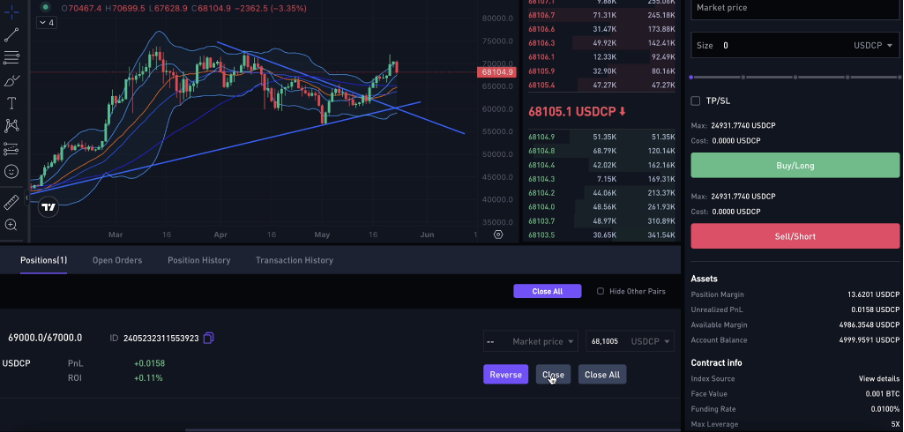
要在 PropW 上关闭一个「*订单*" 或者 "*仓位*」,请前往「*交易*」屏幕的下方。
在下方区域,您可以查看未平仓的仓位和订单。将视线移到未平仓订单的最右侧。在那里,您会看到三个按钮:
**反向**:此按钮用于反向交易。例如,如果您持有多头仓位,可以使用“反向”按钮通过市价单将该仓位转换为空头仓位。
**平仓**:此按钮用于关闭仓位。要使用此按钮,您需要从按钮上方的区域选择关闭类型和要关闭的数量。您可以选择“市价”选项立即平仓,或者使用“限价”选项设置您期望的价格。
**全部平仓**:此按钮允许您一次性关闭所有未平仓仓位。如果您想同时关闭多个订单,可以点击此按钮以关闭所有仓位。
---
# Agent Instructions: Querying This Documentation
If you need additional information that is not directly available in this page, you can query the documentation dynamically by asking a question.
Perform an HTTP GET request on the current page URL with the `ask` query parameter:
```
GET https://docs.propw.com/documentation/documentation-zh/propw-jiao-yi-mo-kuai-ping-tai/integrations.md?ask=
```
The question should be specific, self-contained, and written in natural language.
The response will contain a direct answer to the question and relevant excerpts and sources from the documentation.
Use this mechanism when the answer is not explicitly present in the current page, you need clarification or additional context, or you want to retrieve related documentation sections.