# PropW 訂單
### 訂單類型
PropW 支援兩種訂單類型:「*限價*」和「*市價*」訂單。使用者必須為其想要開立的部位選擇一種訂單類型。以下將說明這些訂單類型。
#### 市價單
市價單是指示立即以當前最佳可用市場價格買入或賣出金融工具的指令。它將執行速度置於價格之上,確保交易能快速成交,但實際成交價格可能與您最初看到的價格略有差異。
#### 限價單
限價單是指示以您設定的特定價格或更佳價格買入或賣出金融工具的指令。這讓您能更精確地控制交易的成交價格。不過,無法保證您的訂單一定會成交,特別是當市場價格未達到您設定的限價時。
#### 調整訂單類型
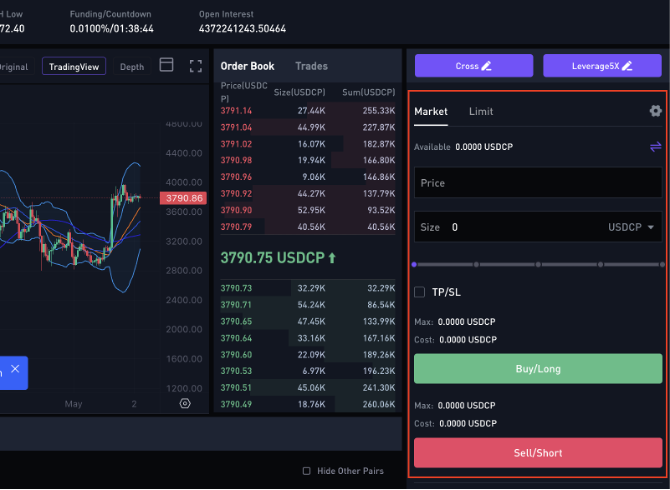
若要變更您的訂單類型,請前往「交易」畫面的右側。在此區域中,您會看到「限價」與「市價」訂單的分頁。請切換到所需訂單類型的分頁。
請指定您的訂單詳細資訊,並使用「*買入/做多*」或「*賣出/做空*」按鈕將其提交到訂單簿。
---
# Agent Instructions: Querying This Documentation
If you need additional information that is not directly available in this page, you can query the documentation dynamically by asking a question.
Perform an HTTP GET request on the current page URL with the `ask` query parameter:
```
GET https://docs.propw.com/documentation/documentation-zh-tw/propw-jiao-yi-mo-zu-ping-tai/images-and-media.md?ask=
```
The question should be specific, self-contained, and written in natural language.
The response will contain a direct answer to the question and relevant excerpts and sources from the documentation.
Use this mechanism when the answer is not explicitly present in the current page, you need clarification or additional context, or you want to retrieve related documentation sections.