# 如何報名參加挑戰?
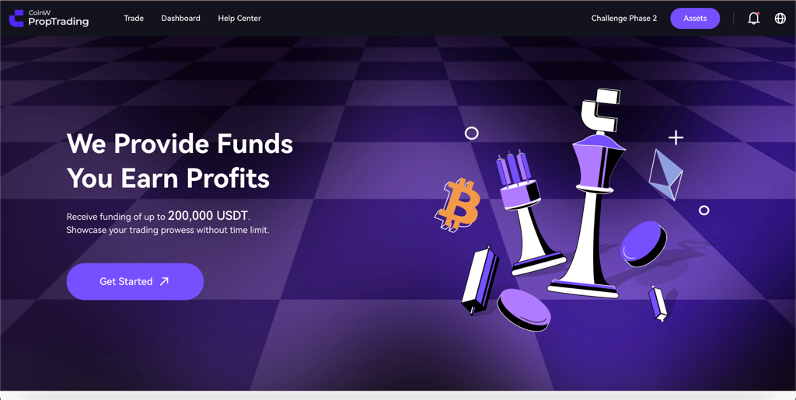
登入 PropW。登入後,點擊首頁上的「*立即開始*」按鈕。這會將您重新導向至挑戰購買畫面。
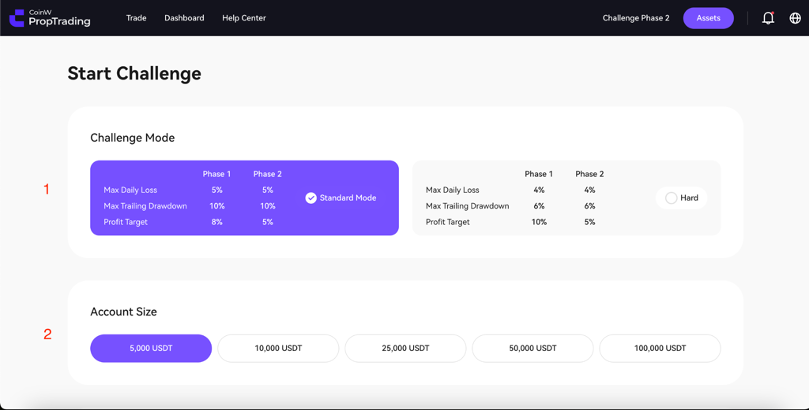
接著,您就可以成功查看挑戰方案。在下方圖片中標示為「1」的區域,選擇您的挑戰模式。請選擇「*標準模式*」或「*困難模式*".
」接著,從標示為「2」的區域選擇您要使用的帳戶規模。在「*標準模式*」中,您可以選擇 $5,000 至 $100,000 的帳戶規模。在「*困難模式*」中,您可以選擇 $10,000 至 $200,000。請選擇您想要的帳戶。
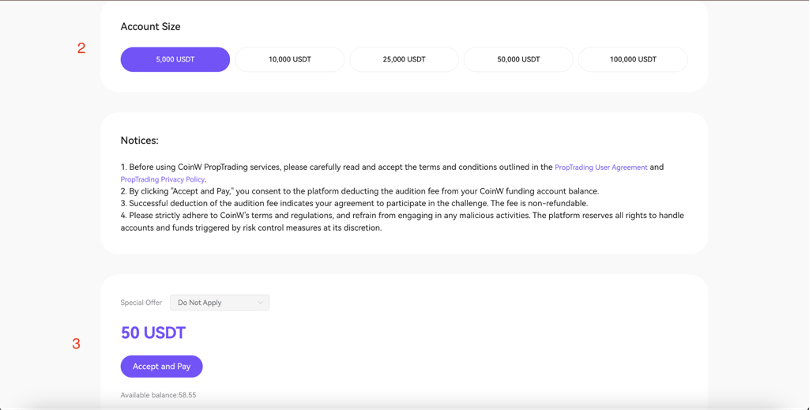
在選擇帳戶規模和挑戰類型後,向下捲動頁面。向下捲動後,您可以在下方圖片中標示為「3」的區域看到該帳戶所需的費用以及您目前的帳戶餘額。
若要報名挑戰,請點擊「*接受並支付*」按鈕。相關帳戶餘額將自動從您 CoinW 的 USDT 錢包中扣除,該帳戶即可開始交易。恭喜!
---
# Agent Instructions: Querying This Documentation
If you need additional information that is not directly available in this page, you can query the documentation dynamically by asking a question.
Perform an HTTP GET request on the current page URL with the `ask` query parameter:
```
GET https://docs.propw.com/documentation/documentation-zh-tw/kai-shi-shi-yong/ru-he-bao-ming-can-jia-tiao-zhan.md?ask=
```
The question should be specific, self-contained, and written in natural language.
The response will contain a direct answer to the question and relevant excerpts and sources from the documentation.
Use this mechanism when the answer is not explicitly present in the current page, you need clarification or additional context, or you want to retrieve related documentation sections.