> For the complete documentation index, see [llms.txt](https://docs.propw.com/llms.txt). Markdown versions of documentation pages are available by appending `.md` to page URLs; this page is available as [Markdown](https://docs.propw.com/announcement/announcement-yue/propw-jing-xuan/publish-your-docs-57.md).
# 公告:PropW 多帳戶購買功能現已上線
親愛嘅 PropW 用家,
我哋好高興宣佈 PropW 嘅多帳戶購買功能正式上線。呢個改進會透過提供更靈活嘅資金管理選項,大大改善你嘅交易體驗。
主要功能:
支援最多同時 5 個挑戰帳戶
方便嘅帳戶切換,實現無縫多帳戶交易
**使用指南:**
如果你已經購買咗第一個挑戰並且想新增更多帳戶,請跟住以下步驟:
喺 PropW 主頁,點擊「開始使用」,然後揀「開始新挑戰」
 喺方案選擇頁面,揀你想要嘅挑戰方案(你可以多次選擇相同方案)\
確保你嘅 CoinW 帳戶有足夠餘額以完成支付\
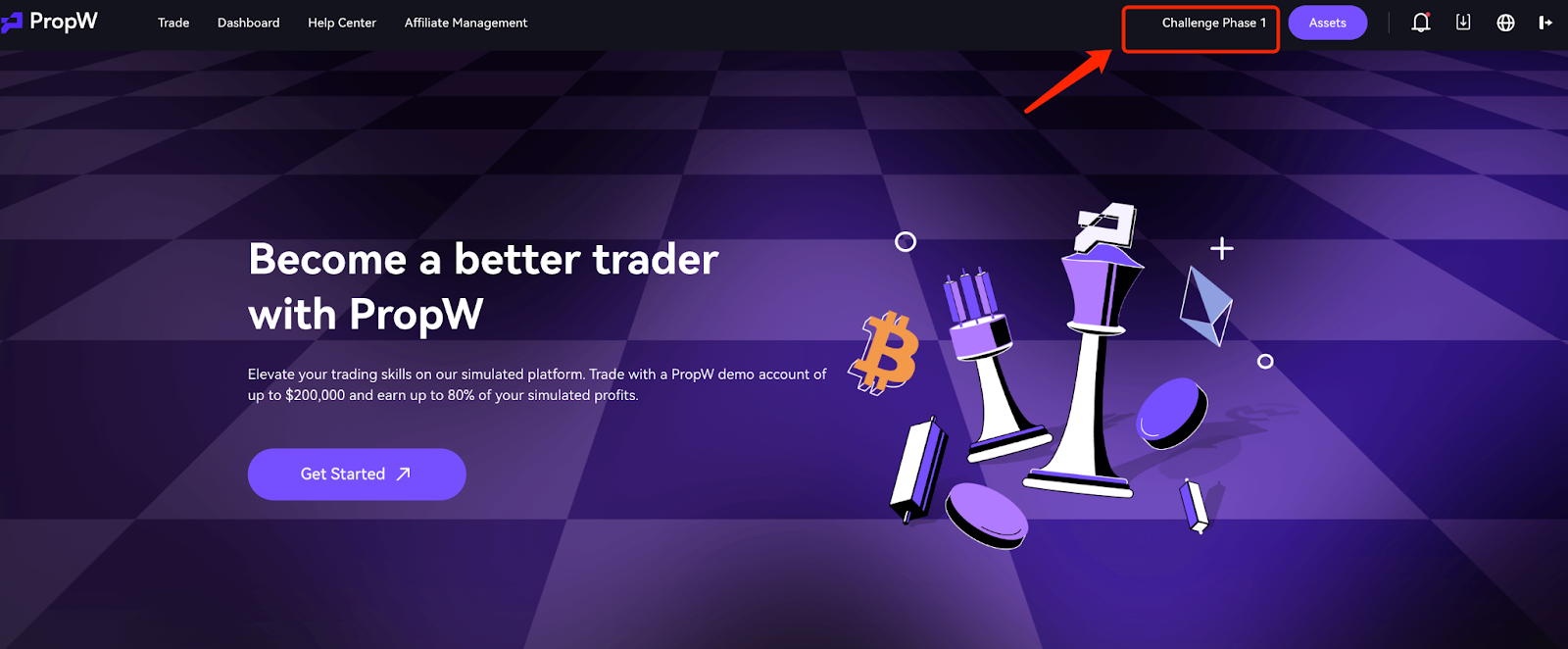 購買成功後,點擊「切換帳戶」按鈕以檢視同管理你所有帳戶
 要切換到其他帳戶進行交易,只需點擊「切換」
 重要注意事項:
多帳戶規則:
多個帳戶可喺挑戰階段同時運作
實盤交易階段只允許 1 個啟用帳戶
如果多個帳戶通過挑戰,佢哋會按完成時間進入審批隊列
隊列中嘅帳戶會被標示為「待啟用」
帳戶管理:
挑戰失敗嘅帳戶或實盤帳戶可以重新註冊
如果實盤帳戶被凍結,喺啟用隊列帳戶之前你必須重新啟用該帳戶
每個 PropW 帳戶嘅數據係隔離嘅—只會顯示當前帳戶嘅數據
付款政策:
所有費用會從你嘅 CoinW 主帳戶扣除
購買前請確保有足夠餘額
\
\
\
PropW 會繼續致力提供優秀嘅交易體驗。如有任何問題,請聯絡我哋嘅客戶支援團隊。
PropW團隊
---
# Agent Instructions
This documentation is published with GitBook. GitBook is the documentation platform designed so that both humans and AI agents can read, navigate, and reason over technical content effectively. Learn more at gitbook.com.
## Querying This Documentation
If you need additional information that is not directly available in this page, you can query the documentation dynamically by asking a question.
Perform an HTTP GET request on the current page URL with the `ask` query parameter, and the optional `goal` query parameter:
```
GET https://docs.propw.com/announcement/announcement-yue/propw-jing-xuan/publish-your-docs-57.md?ask=&goal=
```
`ask` is the immediate question: it should be specific, self-contained, and written in natural language.
`goal` is optional and describes the broader end goal you are ultimately trying to accomplish on behalf of the user. GitBook uses it to tailor the answer towards what is most useful for that goal.
The response will contain a direct answer to the question and relevant excerpts and sources from the documentation.
Use this mechanism when the answer is not explicitly present in the current page, you need clarification or additional context, or you want to retrieve related documentation sections.
重要注意事項:
多帳戶規則:
多個帳戶可喺挑戰階段同時運作
實盤交易階段只允許 1 個啟用帳戶
如果多個帳戶通過挑戰,佢哋會按完成時間進入審批隊列
隊列中嘅帳戶會被標示為「待啟用」
帳戶管理:
挑戰失敗嘅帳戶或實盤帳戶可以重新註冊
如果實盤帳戶被凍結,喺啟用隊列帳戶之前你必須重新啟用該帳戶
每個 PropW 帳戶嘅數據係隔離嘅—只會顯示當前帳戶嘅數據
付款政策:
所有費用會從你嘅 CoinW 主帳戶扣除
購買前請確保有足夠餘額
\
\
\
PropW 會繼續致力提供優秀嘅交易體驗。如有任何問題,請聯絡我哋嘅客戶支援團隊。
PropW團隊
---
# Agent Instructions
This documentation is published with GitBook. GitBook is the documentation platform designed so that both humans and AI agents can read, navigate, and reason over technical content effectively. Learn more at gitbook.com.
## Querying This Documentation
If you need additional information that is not directly available in this page, you can query the documentation dynamically by asking a question.
Perform an HTTP GET request on the current page URL with the `ask` query parameter, and the optional `goal` query parameter:
```
GET https://docs.propw.com/announcement/announcement-yue/propw-jing-xuan/publish-your-docs-57.md?ask=&goal=
```
`ask` is the immediate question: it should be specific, self-contained, and written in natural language.
`goal` is optional and describes the broader end goal you are ultimately trying to accomplish on behalf of the user. GitBook uses it to tailor the answer towards what is most useful for that goal.
The response will contain a direct answer to the question and relevant excerpts and sources from the documentation.
Use this mechanism when the answer is not explicitly present in the current page, you need clarification or additional context, or you want to retrieve related documentation sections.